?> If you are still having problems solving your issue after reading the FAQ, please feel free to open an issue on our [Github](https://github.com/pwa-builder/PWABuilder/issues/new/choose).
# Frequently Asked Questions
Welcome to the PWA Builder FAQ!
Questions are separated by platform. If you're looking for a specific answer and don't see it right away, try entering some keywords in the search feature on the sidebar.
If you have a question that isn't addressed here or elsewhere in the documentation, feel free to open an [issue.](https://github.com/pwa-builder/PWABuilder/issues/new/choose)
## General
### How do I update my store listings? Do I have to republish my PWA?
You don't have to republish to stores when you want to deliver new content to your progressive web app. Just update the content that is being served on the web, and those changes will be automatically reflected in the versions installed from app stores.
## Windows
### Where do I find my publisher information?
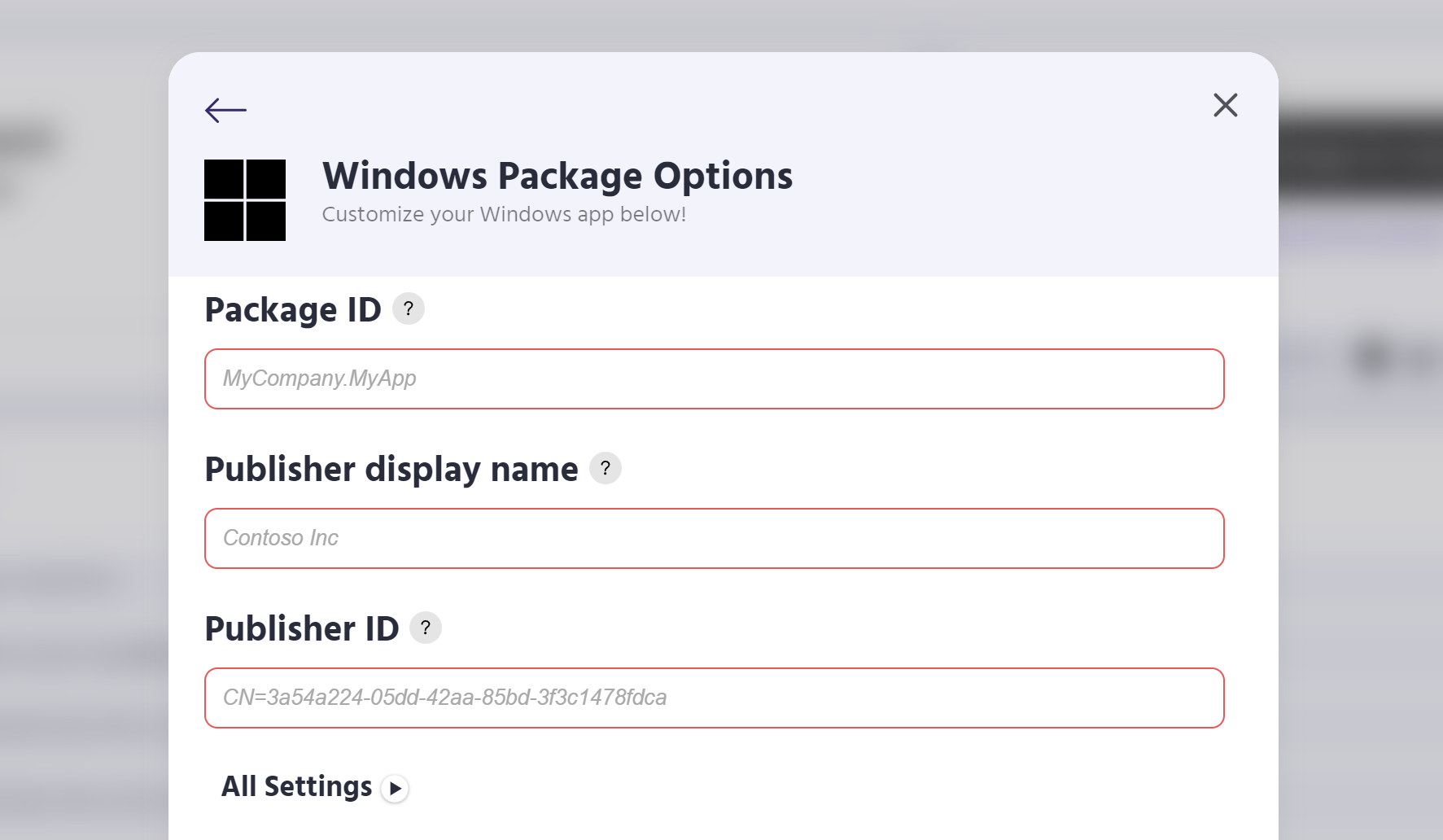
In order to publish your PWA in the Microsoft Store, you'll need three things:
1. `Package ID`
2. `Publisher ID`
3. `Publisher display name`
To get this information, go to [Microsoft Partner Center](https://partner.microsoft.com/dashboard) and click on your app.
Choose `Product Management` -> `Product Identity`:
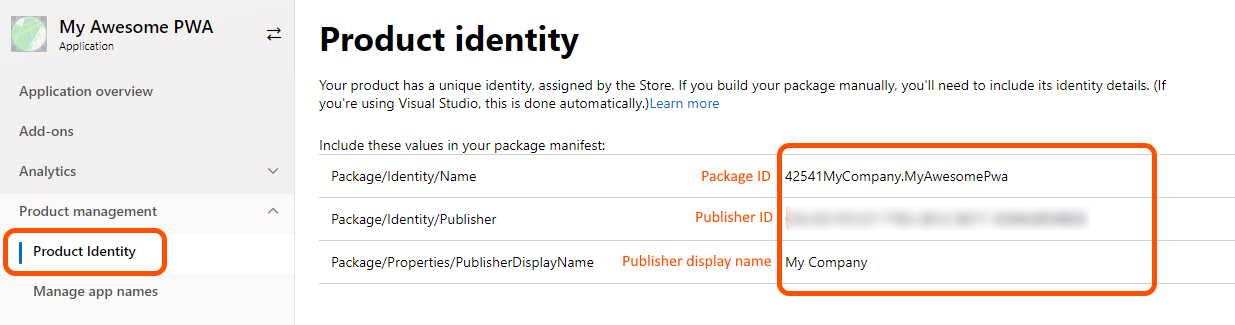
You'll see the Package ID, Publisher ID, and publisher display name. You'll need all three of these to publish in the Store.
On PWABuilder when generating your Windows app, add these values to the Windows package options here:
### What does "This package's manifest uses a display name that you have not reserved" mean?
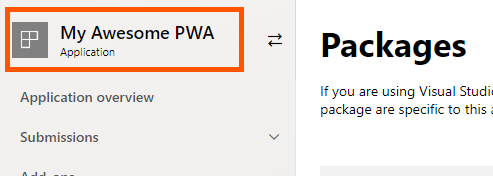
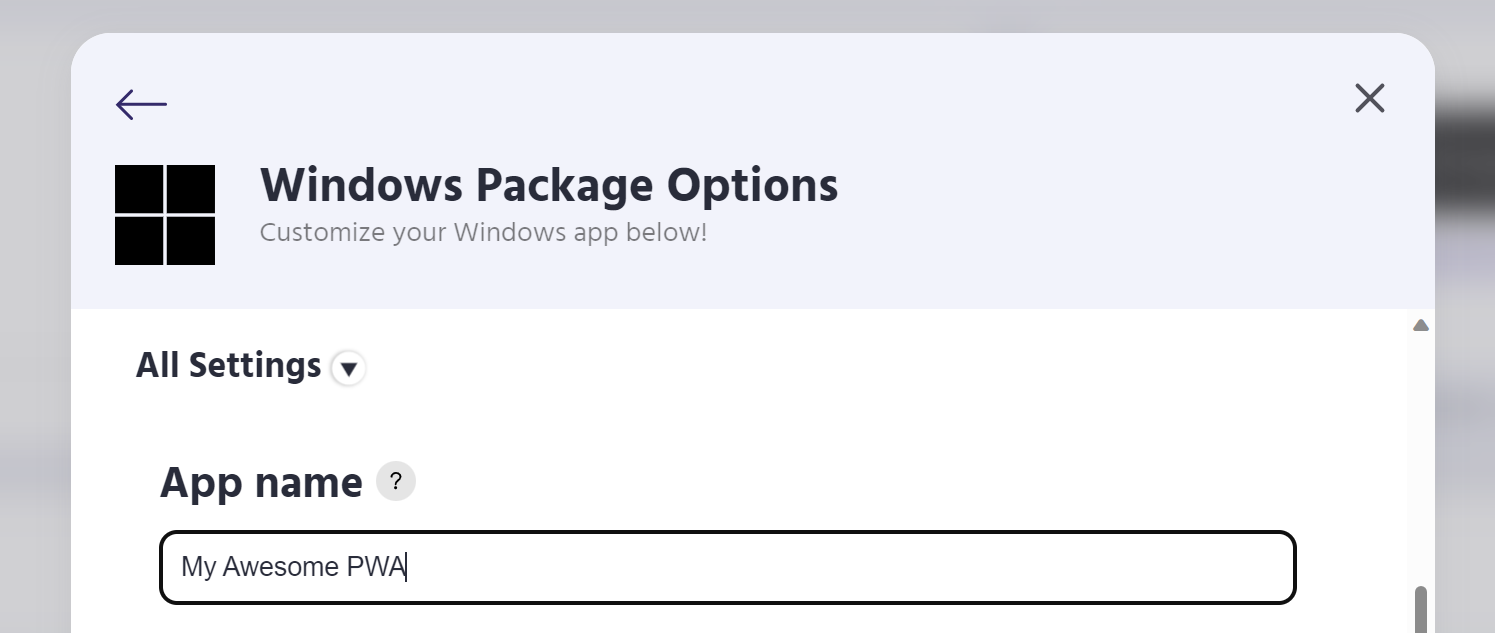
This means the app name you used when generating your app package on PWABuilder doesn't match the app name reserved in Partner Center.
The app name that you chose in in Partner Center:
Has to match the app name you used on PWABuilder:
### How can I associate my website with my Windows App?
You can use `URIHandlers` to tell your Windows Application about your website.
To do this, you need to add a URI Handler extension to your `package.appxmanifest`:
```xml
```
Once you have added the extension, you need to add a file called `windows-web-app-link` to either your server's root or in the `.well-known` directory. In that file, add the following content:
```json
[{
"packageFamilyName": "",
"paths": [ "*" ]
}]
```
### How do I check if my Windows app is installed from my website?
To do the inverse of the above FAQ question, you need to add the following information to your Web App Manifest's `related_applications` member:
```json
{
"related_applications": [{
"platform": "windows",
"id": "",
}]
}
```
The value for `platform` must be `windows`, and the value for the ID field can be found my appending your App ID to your package Family Name, both found in your `package.appxmanifest` file.
Once you have added the `related_applications` entry, you can get a list of check for installed related applications by calling:
```js
const installedRelatedApplications = navigator.getInstalledRelatedApps();
```
### How can I tell if my PWA was launched from the Microsoft Store app?
When your app launches, `document.referrer` will be set to `app-info://platform/microsoft-store`. Note: if your PWA navigates to another URL, or you manually refresh the page of your PWA, `document.referrer` will be empty.
### How can I prompt the user to rate my app in the Microsoft Store?
In JavaScript, navigate to `ms-windows-store://review/?ProductId=[your product ID here]`. The browser will prompt to launch the Microsoft Store ratings & review prompt for your app. [Read more about the ms-windows-store protocol](https://github.com/MicrosoftDocs/windows-dev-docs/blob/docs/hub/apps/develop/launch/launch-store-app.md).
## Android
### Why is the browser address bar still showing in my PWA?
If your address bar is still showing, it probably means there's a problem with your `assetlinks.json` file.
Check out [this article](/builder/asset-links-faq) for info on debugging `assetlinks.json` issues.
### How can I check if my PWA is already installed on Android?
If a user visits your progressive web app from the browser, you can check if your PWA is already installed locally. You only need to make sure your app references itself in your manifest as a related application.
In the `related_application` member array, add:
```json
{
"related_applications": [{
"platform": "webapp",
"url": "https://yourAppDomain.com/manifest.json",
}],
}
```
?> **Note** The `platform` field should always be "webapp" and the `url` should be the full path to your web manifest.
Once you have told your PWA about itself via `related_applications`, you can call the built-in `navigator.getRelatedApplications()` to retrieve a list of installed apps, including your PWA itself.
### How can I tell if my PWA was launched from the Android app?
When your app launches, `document.referrer` will be set to `android-app://` and the HTTP `Referer` header will be set as well. Note: if your PWA navigates to another URL, or you manually refresh the page of your PWA, `document.referrer` will be empty.
## iOS
### How can I tell if my PWA was launched from the iOS app?
At runtime, your PWA will have a `app-platform` cookie. This cookie's value will be set to `iOS App Store`.
### Can I publish to the App Store without a Mac?
No, not currently. You'll need Xcode to build your project, which is only available on Mac.
In the meantime, there are 3rd party build services, such as [AppVeyor](https://www.appveyor.com/pricing/) or [GitHub Actions with Xcode Archive](https://github.com/marketplace/actions/xcode-archive), that can build Xcode projects as part of your continuous integration (CI) pipeline.
Additionally, there are inexpensive services, such as [Macincloud](https://www.macincloud.com/), which let you remote into a Mac with Xcode already installed. You can use those services to build your PWA iOS app package.
### What PWA features can I use on iOS?
Unlike Google Play and Microsoft Store, Apple's App Store doesn't natively support PWAs.
To bridge this gap, your PWA runs in a [WKWebView](https://developer.apple.com/documentation/webkit/wkwebview) hosted inside a native Swift app. Generally, features that work in iOS Safari will work in your PWA.
This includes [service worker support](https://love2dev.com/blog/apple-ships-service-workers/), shortcuts, theme_color, background_color, and more.
Our PWA template currently does not support some PWA features like push notifications.
We'd be glad to accept PRs to add PWA functionality. Our goal is to make this template as close to a full-featured PWA as possible.
To get a glimpse of general PWA support on iOS, we recommend [Maximiliano Firtman's posts on the subject](https://firt.dev/tags/ios/).
### Can I use Push Notifications?
We currently don't support push notifications. We have partial support in the platform for enabling push notifications via Firebase, but the code is currently commented out, and PWABuilder has no UI for letting you input your push notification details.
If Push Notification support is important to you, [upvote this issue](https://github.com/pwa-builder/pwabuilder-ios/issues/6).
### How do updates work?
Since your PWA is being loaded in a web view, pushing changes to your web app will automatically be reflected in your iOS app. No App Store resubmission required.
If you need to make changes to the iOS app itself -- for example, adding new iOS-specific capabilities, or otherwise modifying your app template -- only then you'll need to submit an update to your App Store listing.
### Can I get my PWA in the *Mac* Store?
Yes. While this template is designed for the iOS App Store, you can additionally publish to the Mac App Store.
In [Apple App Store Connect](https://appstoreconnect.apple.com/apps), choose your app. Then under `Pricing & Availability`, enable `Make this app available for MacOS App Store`:
### Can I debug my PWA app on an iOS device?
You can open Safari Dev Tools while your PWA is running in your iPhone simulator.
1. Open your .xcworkspace file in Xcode.
2. Click ▶ to run your PWA inside the iPhone simulator.
3. Open Safar
4. In the top menu bar, choose `Develop` -> `Simulator [device name]` -> `[Your PWA's URL]`
5. Safari's dev tools will open, allowing you to debug your PWA, execute arbitrary JS, set breakpoints, etc.
### Can I customize my source code?
Yes, certainly. Open your project in Xcode and make your changes as usual.
### Can I use iOS capability X?
Yes. To use iOS capabilities, such as `Sign In with Apple`, `Apple Wallet`, `HealthKit`, or other iOS-specific capabilities, you should specify those capabilities while creating your Bundle ID.
Then, make changes to the code to make use of that ability.
### How is this different from the old PWABuilder iOS platform?
Some time ago, PWABuilder had an iOS platform based on the now-deprecated UIWebView. The template lacked a number of PWA integrations, and because it used deprecated technology, couldn't take advantage of new WebKit capabilities, such as service worker support via [App-Bound Domains](https://webkit.org/blog/10882/app-bound-domains/).
This new template is a fresh take on a PWA iOS app using modern iOS technologies and integrating more PWA features where possible.
### Need more help?
Due to the fact that iOS has very limited support for PWAs we will be supporting the iOS in a community driven fashion. This means that there will not be devs from the PWABuilder team maintaining and building out iOS functionality on the site or Discord. Responses will be 100% community driven. Click here to join our [community discord](https://aka.ms/pwabuilderdiscord).
## Common Errors
### Error: `Unable to parse color from string: none`
This usually is a result of the fields `background_color` or `theme_color` being set to `none` in the `manifest` file. These fields are optional so if you do not want to specify a color, you can omit the field all together.
### Error: `Failed to download Web Manifest [URL to Web Manifest]. Responded with status 503`
### Error: 403 Forbidden during analysis or packaging
403 Forbidden means your web app's firewall, CDN, Cloudflare or other security service is blocking PWABuilder from accessing your web app's assets.
PWABuilder uses a user-agent string containing `PWABuilderHttpAgent` to identify itself. You can whitelist this user-agent in your firewall or CDN settings to allow PWABuilder to access your web app.
If you're using Cloudflare, please temporarily disable Cloudflare's "Bot fight mode" while you package with PWABuilder. For more info, see [Cloudflare's Bot Fight Mode documentation](https://developers.cloudflare.com/bots/get-started/bot-fight-mode/).
### Error: `request to [URL] failed, reason: unable to verify the first certificate`
This is likely the result of an incomplete SSL certificate chain. You can test this via [SSLLabs](https://www.ssllabs.com/ssltest/index.html).
### Error: `Error creating app package: Could not find MIME for Buffer stack
This can occur when your web manifest file contains an icon that is either missing or has an invalid MIME type.
The best way to diagnose and fix this issue is, load your web app in the browser, hit F12 to open dev tools, go to the Application tab, and click Manifest. It will show you warnings and errors with your icons.
Fix those, and then PWABuilder should work for you.
### Error: `Failed to download icon [Icon URL]. Responded with status 404`
This error usually occurs when there is an empty array within another array in a manifest field.
For example, here's an invalid icons array in the `shortcuts` field:
```json
"shortcuts": [
{
"name": "Shortcut Link",
"description": "Shortcut Link Description",
"url": "/shortcutlink",
"icons": [
[]
]
}
]
```
This can happen for any JSON array in your manifest, so make sure you delete any nested arrays.